
When we talk about “performance” in game audio, the conversation almost immediately turns to the profiler: How many milliseconds is the mixer thread taking? What is the DSP load? These metrics are critical, but they are only half the story.
In our recent comparative analysis of spatial audio technologies, including atmoky trueSpatial and three leading competitors, we found that “performance” needs to be understood as two complementary pillars: Computational Efficiency and Perceptual Stability. Or as: the numbers vs. the ears.
Fail at the first, and your frame rate drops. Fail at the second, and your player’s immersion and sense of presence breaks.
Here is what we found when testing both dimensions.
The Computational Reality Check
We ran a benchmark on a high-end desktop system (Intel Core i9-14900K, 256-sample buffer at 48 kHz) to evaluate how different spatializers scale with an increasing number of active audio objects.
We compared atmoky trueSpatial against three anonymized competitors (SR, SM, SB), activating only equivalent feature sets. Each source used rotating directivity and continuous listener rotation to simulate worst-case workloads with constant updates of relative direction, i.e. HRTF or panning updates. The test were done in native Unity engine with the respective plugins for the engine. The results, visualized below, show two very different scaling behaviors.
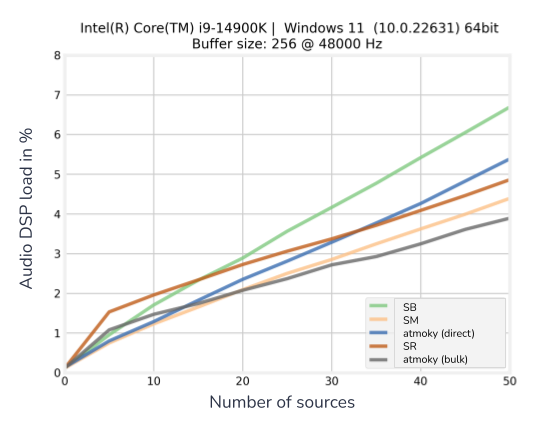
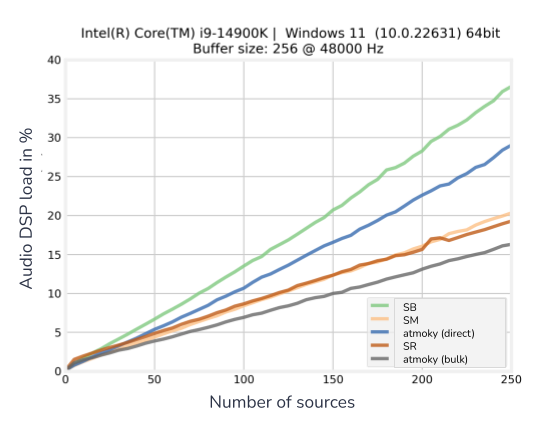
The Data: As the voice count rised from 0 to 250, most spatializers show a rapid, but linear increase in CPU consumption:
- Solution SB struggles significantly, hitting nearly 37% DSP load at 250 sources.
- Solutions SM and SR fare better but still show steeper curves, reaching ~21% and ~19% respectively.
- atmoky trueSpatia (bulk): maintains a notably flat scaling curve. Even at 250 active sources, the DSP load remains below 16%, when using the recommended bulk-processing where all audio objects are transformed to an intermediate formate and then rendered in one go in the atmoky Renderer plugin.
- atmoky trueSpatial (direct): performs exceptionally well for low object counts and enables near-field effects, though it scales less efficiently for high counts. The crossover is around 15 sources. Below that, direct spatialization is optimal. Above that, the bulk renderer is recommended.
Why this matters: This difference in solutions isn’t just about saving a few cycles; it’s about scalability and the maximum number of audio objects you can renderer simultaneously (although this might be a hypothetical one, as almost no one will have 200 objects rendered at the same time). A flatter, linear performance profile means you can design complex, sound-rich environments without fearing that adding “just one more emitter” will topple your CPU budget. On the other hand, the steeper the curve gets, the sooner you hit the upper limit.
The Perceptual Reality Check
Low CPU usage is useless if the audio quality suffers.
To test this, we conducted a “Pink Noise Panning” test, spatializing a pink noise source moving from Front-Right to Front-Left. This is a stress test for spatializers, as it reveals how the engine handles interpolation and HRTF processing during movement.
Using the SAQI (Spatial Audio Quality Inventory – Lindau et al. – https://d-nb.info/1253929041/34) framework, here is what we found:
- Artifacts & Timbre (Competitors): In several instances, we observed audible “switching noises” and comb-filtering artifacts (changes in Timbre) as the source moved. This is often due to a spatializer trying to save CPU by updating filters less frequently or using lower-quality interpolation.
- Spatial Disintegration (Competitors): The movement often felt unstable, as if the sound was “jumping” between discrete segments rather than traversing a continuous path. Lindau et al. refer to this loss of a unified auditory event as Spatial Disintegration.
- Localizability (atmoky): With trueSpatial, the transition was smooth. The sound source maintained a stable trajectory without the “jumping” or coloration artifacts.
See (and Hear) the Difference: We have compiled these findings into a video overview. In this clip, you can see the performance metrics in real-time and hear the difference in spatial stability.
▶️ Watch the comparison here: https://youtu.be/dPSIYvet3hg?si=0qm1WLqHJ0wqRQoW
The 6 Pillars of Tool Selection
While benchmarks are fun, selecting the right tool is a strategic decision. We’ve built our plugins around these six pillars for evaluating spatial audio tools, because “Spatial Audio != Spatial Audio.”- Ease of Use: How pragmatically accessible is the tool? Can you get started without “excessive knowledge,” and is the integration into Unity/Unreal/Wwise/FMOD seamless?
- Support and Documentation: Is the manual clear? Is the support team active? This is often the difference between a shipped game and a stalled one.
- Platform Compatibility: Does it support your runtime environment (Android, VisionOS, Consoles, WebXR)? Cross-platform distribution is key.
- Efficiency and Footprint: As shown in our graph above: how many sources can be handled at the highest quality, and is it eating up your memory budget?
- Real-time Microphone Input: Particularly important for social experiences. Can you spatialize voice chat instantly.
- Multiple Output Formats and Runtime Switching: Can it support multiple input formats (objects, sound beds) and output configurations (headphones, arrays, loudspeakers)?
Conclusion
When choosing a spatializer, look beyond the feature list. “True” performance is the combination of a lightweight footprint that keeps your engineers happy and a stable, artifact-free rendering pipeline that keeps your players immersed. As our data shows, it is possible to achieve one without sacrificing the other.
However, choosing a spatializer is also a strategic decision. This becomes especially clear when comparing free tools with paid solutions. The initial investment for a free tool might look more attractive on paper, but that picture shifts quickly once you enter real production workflows. As soon as you need to build for multiple platforms, handle different output configurations, or maintain consistent behavior across consoles, mobile, desktop, VR, and WebXR, the hidden costs tend to surface.
In many cases, technical sound designers end up writing custom scripts to work around missing features or inconsistencies, or they need to manually rebuild the plugins for specific integrations, platforms, or engine versions. These tasks take time, create maintenance overhead, and often introduce risk at the worst possible stage of development. A paid, well supported solution can reduce that operational burden significantly by providing predictable behavior, stable APIs, proper multiplatform coverage, and guaranteed updates.
Our experience mirrors this: teams that adopted trueSpatial consistently highlighted both the performance and the practical value proposition. Many returned for additional platforms, larger projects, or extended usage because the combination of predictable CPU behavior, stable perceptual rendering, and reliable support proved more cost effective than continuing to patch or extend free tools on their own.
Further Reading
More on trueSpatial, the role of spatial audio for player engagement, and for using atmoky technology can be found here: