
A sound designer recently reached out to us with a straightforward question:
"Why does our gunfire sound darker in binaural mode?"
They were working with object-based spatial audio (atmoky ObjectRenderer), comparing stereo and binaural output. The binaural version had a noticeable tonal shift. Darker, less punchy, like someone had rolled off the highs.
Turns out, nothing was broken. The system was doing exactly what physics demands. The question was whether physics was the right target.
What happens when sound gets (too) close to your head?
When a source is far away (more than about 1 meter), the HRTFs are well-behaved and mostly distance-independent. Your brain uses Interaural Time Difference (ITD) and Interaural Level Difference (ILD) to figure out direction, and pinna filtering to estimate elevation. Standard stuff.
But when a source enters the near field, roughly within 1 meter and especially below 50 cm, three things change:
ILD increases dramatically. Even at low frequencies, where ILD is usually negligible, the level difference between your ears grows fast. Brungart and Rabinowitz measured HRTFs from 12 cm to 1 m and showed that for lateral sources, the ILD increase at close range is substantial across the entire spectrum (Brungart & Rabinowitz, 1999, JASA).
The spectrum shifts. Close sources exhibit a relative emphasis of low-frequency sound pressure, a kind of proximity warmth. At the same time, high frequencies get attenuated more aggressively at the far ear because of stronger head shadowing. The overall effect: the sound gets warmer and duller. For a whisper next to your ear, that’s exactly what you want. For a gun going off in front of your face, it’s the opposite.
Acoustic parallax kicks in. This is the one that surprised our user the most, and it’s also the hardest to explain. When a source is far away, both ears effectively “see” it from the same angle. The angle from the center of your head is a good enough approximation for each ear individually. But when the source is close, the angle of arrival at each ear starts to diverge significantly from the head-center angle. And that divergence is where the coloration comes from.
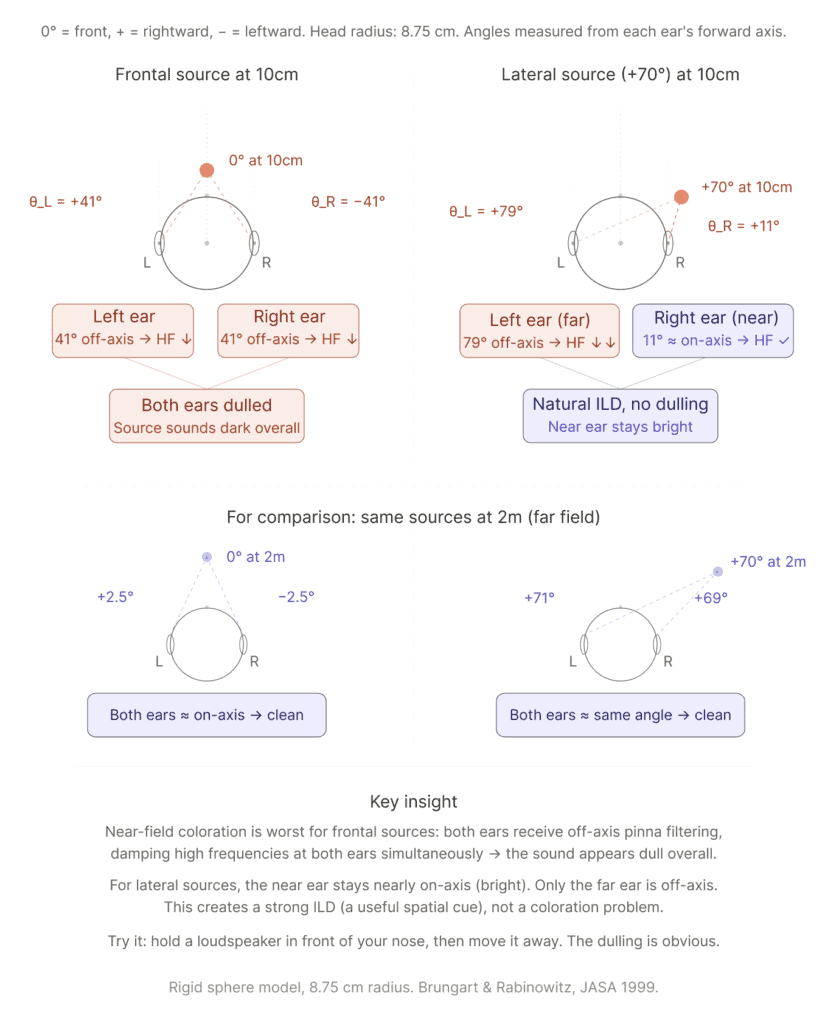
Let’s do the geometry. Assume a standard head radius of 8.75 cm (KEMAR/rigid sphere model). Your ear canals sit at roughly ±90° on the head surface, about 8.75 cm to each side of center.
Lateral source at +70° at 10 cm from head center. Head center says +70°. The right ear (near ear) sees the source at just +11°, nearly on-axis. It gets the full high-frequency content. The left ear (far ear) sees it at +79°, deeply off-axis, and additionally in the head’s acoustic shadow. So the far ear is dark, the near ear is bright. That’s a big ILD, which is a perfectly natural and useful spatial cue. There’s no perceptual “dulling” problem here because the dominant ear (the one your brain relies on for timbre) is receiving a clean, bright signal.
Now compare: frontal source at 10 cm from head center (0°): Head center says 0°. But the left ear, sitting 8.75 cm to the left, sees the source at +41° (shifted to the right of its own forward axis). The right ear sees it at −41° (shifted to the left). That’s an 82° spread between the two ears. Both ears receive pinna filtering for a ~41° off-axis source, not a 0° on-axis source. And pinna filtering at 41° attenuates high frequencies compared to on-axis. Both ears get the same high-frequency damping. The result: the source sounds dull overall. Not because of head shadow, not because of distance attenuation, but because both pinnae are filtering the signal as if it’s coming from the side.
This asymmetry is the key insight: near-field coloration is worst for frontal and really close sources. Both ears get pushed off-axis simultaneously, and since there’s no “bright ear” to anchor the perceived timbre, the entire sound appears filtered. For lateral sources, the near ear stays close to on-axis, so the coloration is asymmetric and perceived as directionality, not as unwanted filtering.
And that’s exactly what was happening with the gunfire. The weapon is attached to the player camera, roughly at 0° azimuth, very close to the listener position (with wrong scaling this gets even worse). Both ears receive heavily off-axis pinna filtering. The Object Renderer was faithfully applying near-field HRTFs with parallax correction. The result was physically accurate. And it sounded like someone put a blanket over the gun.
I actually tested this with a real loudspeaker after the conversation. I held it directly in front of my face, then slowly moved it to arm’s length. The dulling effect was immediately obvious. Now try the same thing from the side: hold the speaker next to your right ear, then move it away. Different effect entirely. The close position sounds loud and lateralized, but not dull. That’s the frontal vs lateral distinction in action.
For reference, at 2 m distance those parallax angles almost vanish. A frontal source at 2 m produces only ±2.5° deviation at each ear (5° total spread). A lateral source at 2 m: +71° vs +69° (1.7° spread). Both ears agree. No coloration issue.
Should it sound physically right? Or should it sound right for the game?
Now here’s the thing: most binaural renderers used in games don’t model any of the above. Get closer = get louder, and that’s it. The spectral shape and binaural cues stay the same whether the source is at 10 cm or 10 meters. And honestly? For gunshots, you could save yourself some trouble that way.
trueSpatial does model these effects in the object-based workflow: i.e. the ObjectRenderer in Wwise, the atmoky Spatializer in FMOD, and the Spatializer in Unity and Unreal Engine. These plugins simulate how we actually perceive sounds at different distances, including the ILD changes, spectral shifts, and parallax described above. That enables a level of spatial intimacy that far-field-only renderers can’t produce. A whisper that actually feels like it’s at your ear. An insect buzzing past your head. Breathing down your neck in a horror game. That’s where near-field rendering shines.
But it also means the coloration is there for sources where you might not want it. And now you know why: it’s specifically the frontal geometry that causes both-ear high-frequency attenuation. A weapon at 0° azimuth, close to the listener, is the worst case.
So the question isn’t whether the physics is right. The question is: does every source in your game need to follow the physics?
Recent research supports this nuance. Arend et al. (2021) ran listening experiments in a dynamic, multimodal VR environment and found that naive listeners could not reliably distinguish physically accurate near-field HRTFs from simple intensity-scaled far-field HRTFs. In a rich context with visual cues, head tracking, and room acoustics, the extra spectral detail of near-field rendering got masked. The authors concluded that the additional effort of including near-field cues “may not always be worthwhile for virtual or augmented reality applications” (Arend et al., Acta Acustica, 2021).
That doesn’t mean near-field is useless. It means the decision is context-dependent, per source, per game. And that’s exactly how we think it should be controlled.
Hey, that’s why we’re making it controllable. We’re adding the ability to toggle near-field parallax on or off per object. Whisper in a horror game? Parallax on, full intimacy. Shotgun blast at 0°? Parallax off, keep it bright and punchy. Same renderer, same spatial quality, you just decide per source whether the proximity effect is what you want. Most likely this will ship as a dedicated metadata plugin, so it slots right into your existing workflow.
Until that’s ready, here’s what works today:
The practical solution (today): choose per source
The workaround we recommended (and that’s now our recommended best practice for Wwise projects but similar goes for FMOD) is a dual-bus setup:
Create two buses side by side under your Master bus. One is an Objects bus with the Object Renderer (full near-field treatment, parallax, coloration, that works). The other is an Ambisonics (Wwise) / 7.1.4 (in FMOD) bus with the Renderer, which does not apply near-field effects. Route each sound to whichever bus fits the design intent.
Gunfire, UI, sources that should stay transparent? Ambisonics / 7.1.4 bus. Whispers, insects near the ear, breathing, intimate foley? Object bus.
This gives sound designers explicit control over which sources get the proximity effect and which stay clean, using the same spatial audio engine for both.
A follow-up question from the project was: “If we disable near-field, do we also lose the interaural delay?” The answer is no. ITD and ILD are preserved. You keep full binaural spatialization, direction, externalization, everything. What goes away is only the proximity-induced spectral coloration and the exaggerated level changes that come with very close sources. Best of both worlds.
The 0/0 trap and the walk-through problem
While debugging this, we hit another classic issue that comes up in almost every project at some point.
In the Wwise authoring tool as well as in FMOD Studio, when you’re previewing spatial audio without connecting to a game engine, the listener sits at the origin: position 0, 0, 0. If your sound source is also at the default position (also 0, 0, 0), the source is literally inside the listener’s head. Distance is zero, not a defined state. Each ear sees the source at ±90° off its own forward axis. That’s the maximum possible pinna filtering. Maximum dullness. ITD and ILD are both zero (for symmetrical HRTFs), so the source collapses to center. It sounds terrible, and it’s not a bug. It’s just the worst-case geometry.
The fix is simple: either connect to a game engine for proper source/listener positioning, or use emitter automation in Wwise Authoring (move the sound source off the center in FMOD 3D Preview) to move the source to a real position.
This connects to a broader question every game audio developer eventually faces: What happens when a player walks through a sound source?
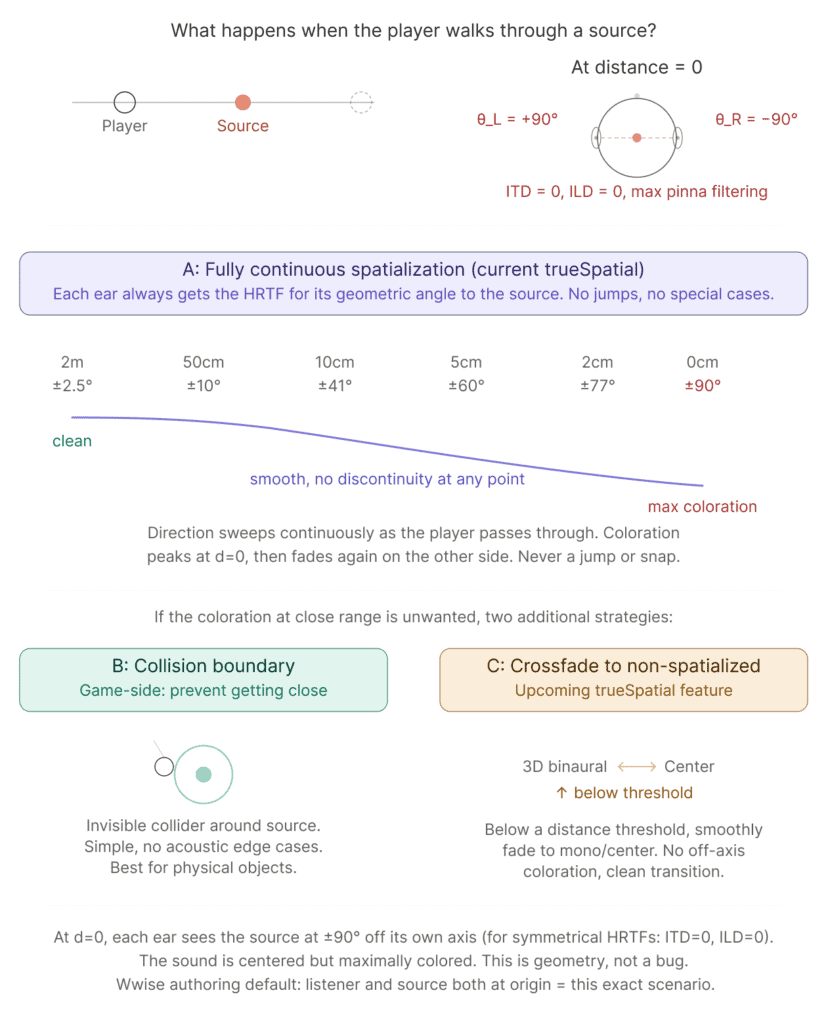
In reality, you can’t walk through a vibrating object. And in most games, you can’t either, because the emitter is attached to something with a collider: a wolf, a radio, a generator. But there are cases where it happens: ambient sources without a physical object, emitters on destroyed/disappearing objects, or simply previewing in the Wwise authoring tool where both listener and source default to origin.
How trueSpatial handles it: fully continuous spatialization. Each ear always gets the HRTF for its geometric angle to the source. No minimum distance clamp, no special cases, no jumps. As the player approaches, the ear angles increase smoothly from ±2.5° (at 2m) to ±41° (at 10cm) to ±90° (at 0cm). If the player walks through, the direction sweeps continuously and the coloration peaks at the closest point, then fades again on the other side. This was a deliberate design decision: smoothness matters more than avoiding the edge case. A discontinuity or a sudden behavioral switch would be far more noticeable than the coloration.
If the coloration at close range is unwanted for specific sources, two additional strategies:
Collision boundary. Game-side solution: put an invisible collider around the source. The player can’t get closer than 15 cm or whatever distance works for your design. Simple, effective, no acoustic edge cases. Best for point sources attached to physical objects.
Crossfade to non-spatialized. Below a certain distance threshold, smoothly fade from 3D binaural to a mono center mix. No off-axis pinna filtering, clean transition. This is what we’re planning to support natively in a future trueSpatial update, most likely as a per-object toggle or metadata plugin. So you’ll be able to decide per source whether it gets the full near-field treatment or fades to center at close range.
No single right answer. Depends on the source, the game, the player’s expectations. But ignoring the problem and hoping nobody walks too close? That’s not a strategy. Speedrunners will find it.
Try it yourself
Two experiments with a loudspeaker (not a phone, you need proper low end), playing broadband content (music, speech, white noise).
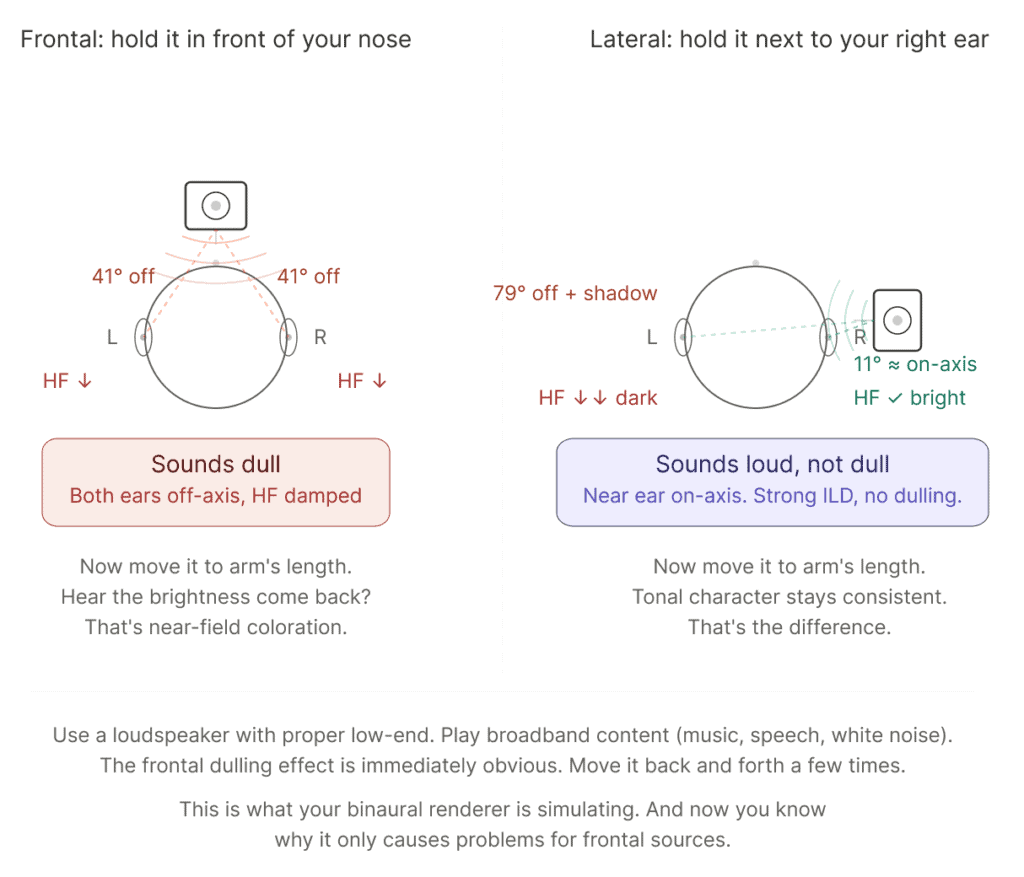
Experiment 1 (frontal): Hold it directly in front of your nose. Then slowly move it to arm’s length. Listen for the tonal shift. The close position sounds warmer, duller, filtered. The far position sounds cleaner, brighter, more neutral. That’s both pinnae filtering off-axis simultaneously.
Experiment 2 (lateral): Now hold it right next to your right ear. Then move it to arm’s length, keeping it to the side. The tonal character stays much more consistent. The close position is louder and more lateralized, but it doesn’t get dull the way the frontal case does. The near ear is receiving on-axis sound the whole time.
That difference is the whole story. Near-field coloration is a bit of a frontal “problem”. And whether you want it in your game depends entirely on what you’re building.
trueSpatial implements near-field effects (low-shelf boost, increased ILD, parallax) for FMOD, Wwise, UE, and Unity. The dual-bus setup described above works today. Per-object near-field toggle is coming. Try it: developer.atmoky.com
References
- Brungart, D. S., & Rabinowitz, W. M. (1999). Auditory localization of nearby sources. Head-related transfer functions. J. Acoust. Soc. Am., 106(3), 1465–1479. https://doi.org/10.1121/1.427180
- Brungart, D. S. (1999). Auditory parallax effects in the HRTF for nearby sources. Proc. IEEE WASPAA, New Paltz, NY, pp. 171–174.
- Arend, J. M., Ramírez, M., Liesefeld, H. R., & Pörschmann, C. (2021). Do near-field cues enhance the plausibility of non-individual binaural rendering in a dynamic multimodal virtual acoustic scene? Acta Acustica, 5, 55. https://doi.org/10.1051/aacus/2021048
- Kan, A., Jin, C., & van Schaik, A. (2009). A psychophysical evaluation of near-field head-related transfer functions synthesized using a distance variation function. J. Acoust. Soc. Am., 125(4), 2233–2242. https://doi.org/10.1121/1.3081395
- Arend, J. M., & Pörschmann, C. (2019). Synthesis of Near-Field HRTFs by Directional Equalization of Far-Field Datasets. Proc. DAGA, Rostock, pp. 1454–1457.